Phybridge's (News - Alert)product, the UniPhyer, is described by company officials as 'a new standard for IP telephony infrastructure… a low-cost, risk free, robust, quick and easy VoIP enabler.'
Basically, the way company officials explain it, the Phybridge UniPhyer uses existing telephony cabling to provide a complete IP network for voice and data, which allows you to centrally converge with the LAN. If that's what you're looking for this is certainly something you want to look into.
The Phybridge UniPhyer also provides a dedicated path for voice, QoS and POE to every desktop, if that's on your wish list as well.
And if you're looking to transition to IP telephony it's something you might want to check into, especially if you want to have reliable phone systems based on 'robust and resilient legacy PBX (News - Alert)systems' Phybridge officials say.
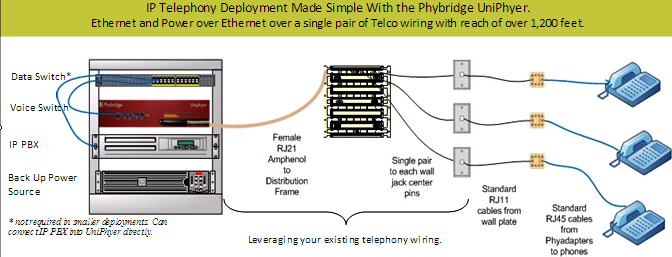
If you're considering such a system, bear in mind, Phybridge officials say, that some PBX systems do not integrate readily with data networks, a pre-requisite for unified communications. IP telephony, on the other hand, is the preferred means for unified communications, but IP-PBX/IP phones lack the reliability one has come to associate with legacy PBX Systems.
This is where they see a market opportunity for the Phybridge UniPhyer, which enables IP phones to achieve the reliability and voice clarity of traditional phone systems without, as they say, 'sacrificing any of the benefits of IP Phones.'
Phybridge officials say their system offers a 'non-disruptive transition to IP telephony,' and describe the steps you can take:
First, remove the existing telco connector from the legacy PBX and connect to the Phybridge UniPhyer. Then connect the Phybridge UniPhyer to the IP PBX or router/LAN, and connect the PhyAdapters to the existing telephone jacks at the desktop and connect the IP Phones to the PoE enabled phone jack on the PhyAdapter.
There you go, you're in business.
David Sims is a contributing editor for TMCnet. To read more of David's articles, please visit his columnist page. He also blogs for TMCnet here.
Edited by Stefania Viscusi

 Internet Telephony Magazine
Click here to read latest issue
Internet Telephony Magazine
Click here to read latest issue CUSTOMER
  Cloud Computing Magazine
Click here to read latest issue
Cloud Computing Magazine
Click here to read latest issue IoT EVOLUTION MAGAZINE


